 RU
RU  EN
EN The Calendar is an additional option for posting notes. You can place your notes not only by sections, but also link them to specific dates. Of course, not all notes make sense to be linked to dates. For example, if you wrote down a pie recipe or some useful tip in a note, there is no point in tying it to any date. But if you have a note reminding you of a doctor's appointment, a birthday, or some other event, it makes sense to place this note not only in the selected section, but also in the Calendar.
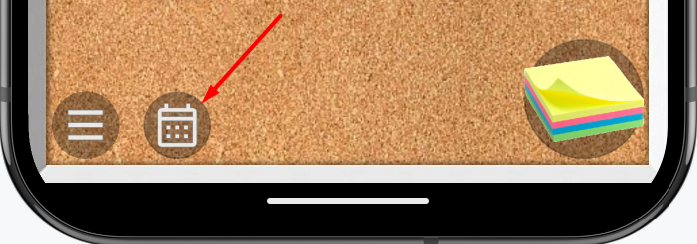
To open the Calendar, click on the button with the calendar image at the bottom left of the board:
The general appearance of the Calendar, with notes placed, looks like this:
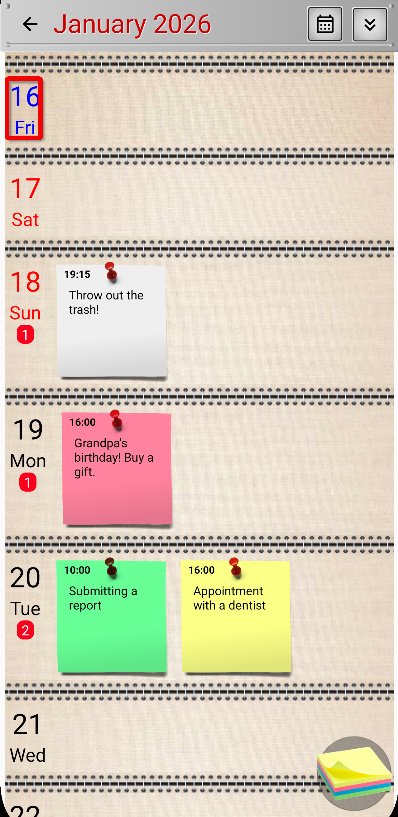
You see a daily calendar that you can scroll up and down. Notes are attached to each day in chronological order, i.e. according to the time indicated in the note. If you have many notes attached to one day, they will scroll horizontally, left and right.
👉 The number of notes for each day is indicated on the left in a red circle.
👉 Today's date is outlined in red.
👉 Weekends are highlighted in red. You can set which days of the week are considered weekends in the "Calendar Setting" section of the "Settings" menu.