This section contains settings that affect the operation of the entire application or cannot be assigned to other sections.

Here you can enable the following options:
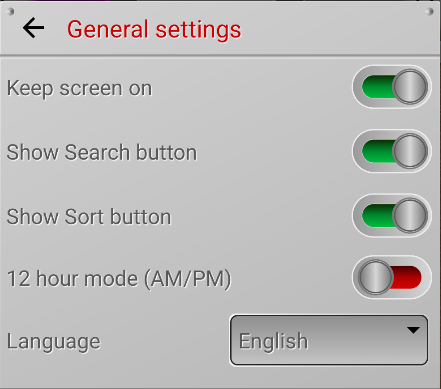
Keep screen on

If this option is enabled, your phone will not go to sleep or lock mode while the app is in the foreground.

Show search button

The app has a search system that allows you to find notes by keywords. If you enable this option, a Search button will appear in the upper right corner of the screen.

Show note sorting button

The app has the ability to automatically sort notes by various parameters. If you enable this option, a button for sorting settings will appear in the upper left corner of the screen.

12-hour mode (AM/PM)

By default, the app uses a 24-hour time format. Enable this option to use 12-hour clock mode in notes and reminders.

Language

The app supports multiple languages. By default, it selects the language set for your phone's interface. If the application does not support your language, English is selected. However, you can choose another language from those available in the application.


Additional Shortcuts

On your phone's screen, each app has a shortcut that you can use to launch it. But you can add additional shortcuts to the screen that make working with the application easier and faster. To add a shortcut to your phone's screen, tap the corresponding button.


  • Calendar – the application opens immediately in calendar mode. In addition, on this shortcut you will immediately see the number of events for today.
  • Search notes – a search window opens where you can find the notes you need by keywords.
  • Add note – quickly add a new note without opening the main app.
  • Add note with photo – adds a new note and launches the Camera app for adding a photo as an attachment.
  • Add note with video – adds a new note and launches the Camera app for adding a video as an attachment.
  • Add audio note – adds a new note and launches Voice Recorder for adding an audio recording as an attachment.