 RU
RU  EN
EN
Recurring Reminders
If you want a reminder to occur not just once, but periodically, at specific intervals, you can set a recurring reminder. To do this, in the reminder setup window, switch to the "Repeat" tab and enable the "Periodic signal" option.
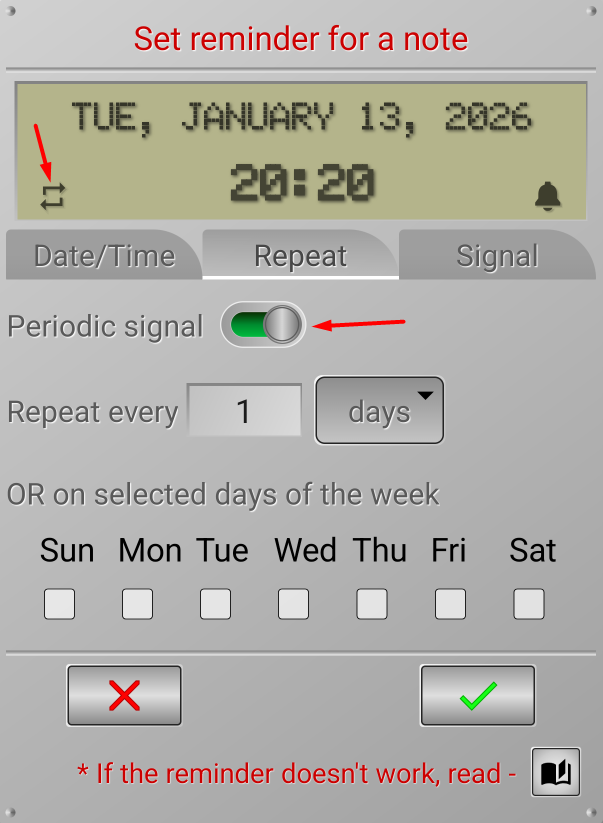
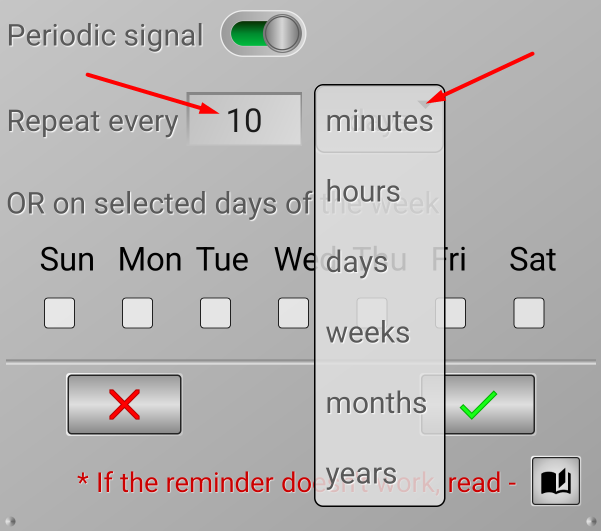
The repeat period settings will appear on the screen, along with a repeat icon in the lower left corner of the display. You can set the reminder to repeat after a certain number of minutes, hours, days, weeks, months, or years. Enter the number in the input field, and select the desired interval from the drop-down list:
If you only want reminders on certain days of the week, you can check the boxes for those days. However, note that it says "OR." This means that if you select days of the week, the previous period setting is canceled.
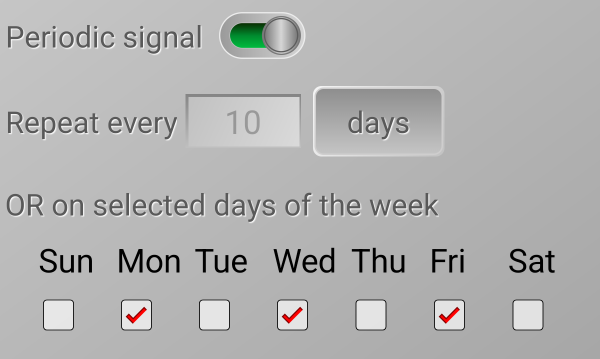
For example, if you check the boxes as shown in this image, the reminder will occur every Monday, Wednesday, and Friday at the set time. This reminder will only occur once per day.
Note 3:
Enabling the "Add to Calendar" option for a recurring reminder does not mean the note will appear on all those days "indefinitely." The note will only be attached to the date of the next reminder trigger. After the recurring reminder triggers, the note will be moved to the next trigger date, and so on.